
50 styles · Reel, feed and square · No login
Giveaway winner reveal videos, made from your real draw
Pick your winner with Pickfetti, then choose how to announce it. The reveal studio turns the draw into a short video in 50 styles, with the names of real entrants rolling past before the winner lands. Preview every style free.
2 styles download free. All 50, your colors and your logo: $4.99 one-time for that giveaway, or included in Pro.
All 50 reveal styles
Tap a style to play it. These samples use made-up names; yours uses your giveaway.
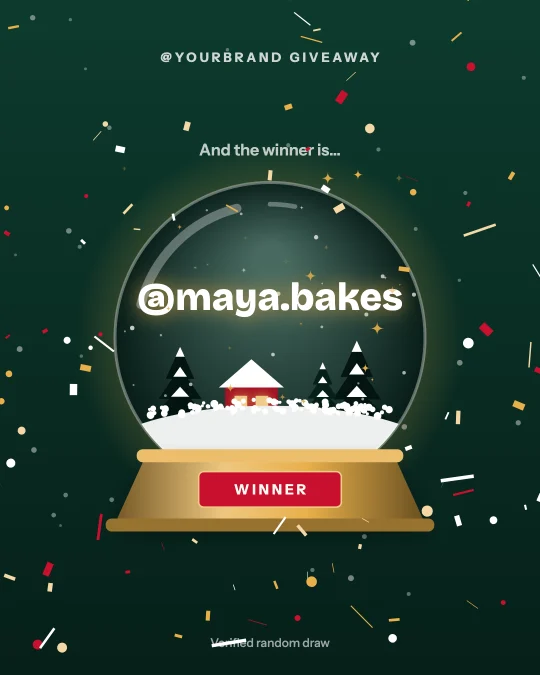
Now playing
Snow Globe
A snow globe shakes, the snow swirls and settles, and the winner’s name glows inside the glass.
Sample reveal. In the studio it shows your winner, your @handle and your logo.
What you get, in plain facts
- Styles
- 50: 2 free (Confetti Cannon + Classic Roll) and 48 premium
- Shapes
- Reel / Story 9:16 (1080×1920), feed 4:5 (1080×1350) and square (1080×1080)
- File
- MP4 where your browser can record it (Safari, recent Chrome), otherwise WebM. 30 frames per second. No sound, so you can add your own audio in Instagram.
- Length
- About 6 to 10 seconds for one winner. Up to 5 winners each get their own reveal; more are listed on the closing card.
- Branding
- Ready-made color sets on every style. With the upgrade: any three colors of your own and your logo in the header.
- Real draw
- The names that roll past are real entrants from your giveaway and the winner is the one on the public proof page. The video shows the draw; it does not decide it.
- Login
- None. No Instagram login, no account. The video is made in your browser and your logo never leaves it.
- Price
- Preview every style free. 2 styles download free with a small Pickfetti credit. Everything else: $4.99 one-time per giveaway, or Pro at $9/month.
How to make a winner announcement video
-
1
Run the draw
Paste the link to your Instagram post or Reel (or a list of entries), set your rules and pick the winner. Free for most giveaways.
-
2
Choose a style
The studio opens under the result. Swipe through 50 styles, pick a shape, change the colors, add your logo. Every change replays instantly with your winner.
-
3
Download and post
Save the video and post it as a Reel, a Story or a feed post. Link the public proof page in your caption or bio so anyone can check the draw.
Free and paid, side by side
| Free | Upgrade · $4.99 per giveaway | Pro · $9/month | |
|---|---|---|---|
| Preview all 50 styles with your winner | ✓ | ✓ | ✓ |
| Download Confetti Cannon + Classic Roll | ✓ with Pickfetti credit | ✓ no credit | ✓ no credit |
| Download the 48 premium styles | — | ✓ | ✓ |
| Your own colors and logo | Preview only | ✓ | ✓ |
| Reel, feed and square shapes | ✓ | ✓ | ✓ |
| Unbranded winner card, unlimited redraws | — | ✓ for that giveaway | ✓ every giveaway |
Winner reveal video FAQ
How do I make a giveaway winner announcement video for Instagram?
Run your draw on Pickfetti by pasting the post link. When the winner is picked, the reveal studio appears under the result with 50 video styles. Choose one, pick Reel, feed or square, and download it. The whole thing takes about a minute and needs no video editor.
Is the winner reveal video free?
Previewing is free for every style. 2 styles (Confetti Cannon + Classic Roll) download free with a small Pickfetti credit. The other 48 styles, custom colors and your logo are $4.99 one-time for that giveaway, and are included in Pro ($9/month).
Is the video a real draw or just an animation?
The winner is chosen first by Pickfetti’s verifiable random draw, and that result is published on a public proof page with the random seed and a hash of the entry list. The video is an animation of that result: the names rolling past are real entrants and the name that lands is the drawn winner. It cannot show a different winner from the proof page.
Can I use my brand colors and logo?
Yes. Pick any three colors and upload a logo; the preview updates instantly. The logo is read in your browser and is not uploaded to Pickfetti. Downloading a video with your own colors or logo needs the per-giveaway upgrade or Pro.
What size and format is the video?
1080 pixels wide in three shapes: 1080×1920 for Reels and Stories, 1080×1350 for the feed and 1080×1080 square. It is saved as MP4 where the browser supports recording MP4 and as WebM otherwise, at 30 frames per second, with no audio track.
Can it show more than one winner?
Yes. Up to five winners each get their own reveal in the same video, and any further winners are listed on the closing card.
Does it work for YouTube, TikTok or Facebook giveaways?
The studio works on any Pickfetti draw. Instagram posts and Reels and YouTube videos can be drawn from the link; for TikTok, Facebook or anything else, paste the entries as a list and the same reveal styles are available.
Do I need to install anything or log in?
No. It runs in the browser on a phone or a computer, with no Instagram login and no account.
Your winner, announced properly.
Pick a winner and make the video →Related: How to announce a giveaway winner on Instagram · Instagram comment picker